New Inspiro AI Demo Generator — can't find the perfect demo? Describe your website and AI builds a custom one in about 2 minutes. Learn more →

Knowledge Base

Documentation

Theme Documentation


Plugin Documentation


Resources

Reel – Setting up the Blog Page

This article refers to Reel

With your homepage set to a portfolio or a custom layout, the blog moves to its own page. Reel uses WordPress’s standard Posts page mechanism for this.


Create the blog page

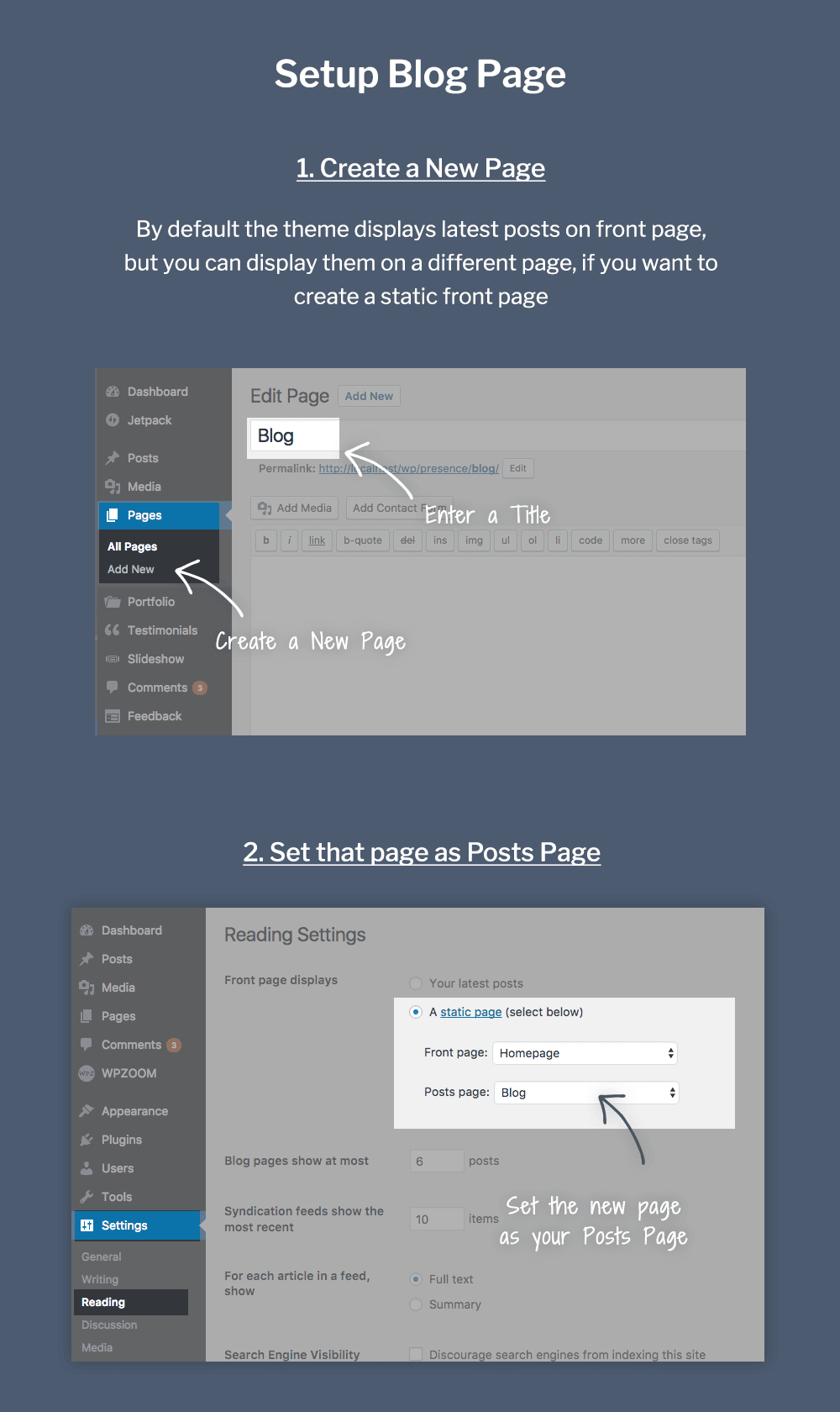
  1. Go to Pages → Add New and create an empty page called e.g. Blog or News, then publish it.
  2. Go to Settings → Reading.
  3. Under Your homepage displays, select A static page, set your homepage under Homepage, and choose the new page as the Posts page.
  4. Add the page to your menu (Appearance → Menus).

The page now lists your latest blog posts with pagination — its content area is ignored, so leave it empty.


Customize the listing

Blog listing options live in WPZOOM → Theme Options → General → Blog Posts — the featured image, excerpt and its length, and the post meta shown for each entry:

Blog Posts options in Theme Options

Single post display is controlled in the Single Post Options section on the same page.

Tip: to change the summary shown for a post, use the post’s Excerpt field — otherwise the theme picks the first words of the content automatically.


See also:

Last updated on August 29, 2026
