Starting a blog about photography is an exciting journey into capturing and sharing the world’s beauty through your lens. Photography blogging is an excellent way for enthusiasts and professionals alike to showcase their work, share tips and tricks, and connect with a community of like-minded individuals.
Starting a photography blog is as straightforward as snapping a photo, yet transforming it into a thriving photography business is where the true challenge lies. From the start, it’s crucial to understand that building a successful photography blog is a marathon, not a sprint. Your triumph isn’t something that occurs overnight, nor is it assured.
Here’s a straightforward guide on how to start a photography blog, ensuring you present your work in the best light and connect with an audience that shares your passion.
Quick Guide to Starting a Photography Blog
Here’s a quick summary of the critical steps involved in starting and maintaining a photography website:
- Step 1: Identify Your Photography Blog Niche
- Step 2: Choose a Name and Secure Your Domain
- Step 3: Select a Hosting Provider
- Step 4: Install WordPress
- Step 5: Select a Photography Theme
- Step 6: Customize Blog Settings
- Step 7: Install Essential Plugins
- Step 8: Plan and Create Captivating Posts
- Step 9: Promote and Expand Your Photography Blog
- Step 10: Earn Money from Your Photography Blog
Now, explore each aspect in more detail to ensure you’re well-equipped to make your photography blog successful.
10 Steps to Start a Photography Blog: A Detailed Guide
The steps to start a photography blog are relatively straightforward. Still, some parts are slightly unintuitive, and this guide will make the whole process much more manageable.
1. Identify Your Photography Blog Niche
In an era where the internet is filled with talent and creativity, failing to select your niche carefully could slow down your path to success. Consider this analogy: if you were to launch an online store, would you opt for a general merchandise approach, or would you succeed in specializing in a niche market, such as vintage camera equipment? Given the dominance of major retailers, a focused niche approach is more likely to stand out.
This logic applies seamlessly to launching your own photography blog. The digital world is already populated with successful photography blogs capturing significant attention and traffic. Identifying and filling a void is critical to carving out your own space. For instance, if you have a passion for a specific photography style or genre, like macro photography or wedding photography, this is where your focus should shine. Launching a photo blog centered around a broad topic like “travel photography” might be more challenging than one focused on “abandoned places photography.”
Finding your niche might seem challenging, but here are some strategies to make it simpler and more effective:
- Personal Interests: Your passion and knowledge of photography are crucial. Are you fascinated by black-and-white photography, drone shots, or portrait photography? Your interests should guide your choice.
- Market Gaps: Look for underserved areas within photography blogging. There may be a rising interest in analog or infrared photography that has yet to be fully explored.
- Audience Needs: Consider the interests and needs of your potential audience. You may aim to attract budding photographers who seek guidance on improving their skills, or your target audience is travelers looking for tips on capturing the essence of their journeys through photography. Tailoring your content to meet these needs can make your blog more appealing.
Achieving success in the online photography sphere requires a clear plan and a focus on your chosen niche. Everything starts with identifying the right niche for your blog.
2. Choose a Name and Secure Your Domain
Selecting the perfect name for your photography blog is crucial in establishing your online presence. It should be memorable and engaging and reflect the essence of your photography niche. Several factors should guide your decision-making process, whether you opt for a clever play on words or a more direct approach.
- Choose short and relevant words. A concise name is easy to recall and helps create a strong brand identity.
- Ensure it’s simple to spell. Your blog’s name, which doubles as your URL, must be straightforward to spell for better recall and association with your photography niche.
- Avoid overly technical terms. While it may be tempting to use photography-specific jargon, remember that your audience might have differing levels of expertise. Keep it accessible.
- Prioritize uniqueness. A distinctive name sets you apart and can provide an edge in attracting attention.
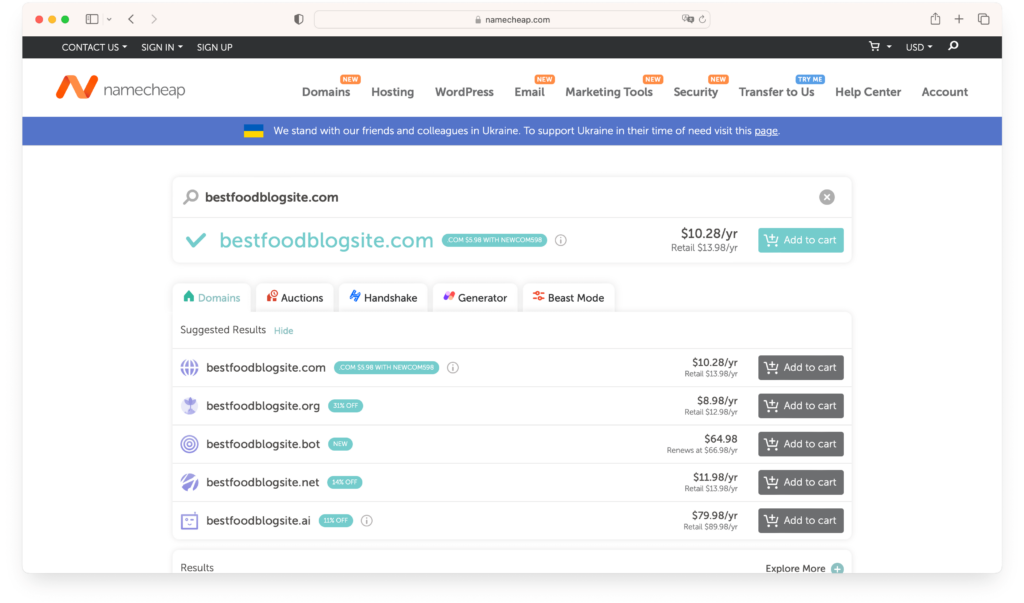
With your photography blog’s name in hand, the next step is to secure a domain. Today, registering a domain name is a straightforward process, thanks to numerous tools and services available.
3. Select a Hosting Provider
Selecting the right hosting provider is one of the crucial steps when kicking off a blog on photography. This decision can significantly influence your site’s performance, which can dictate the level of success your blog might achieve. Opting for a good hosting service from the start can prevent a lot of headaches in the future.
Be aware that the market is flooded with options for hosting services. However, there are specific criteria you need to assess before settling on a provider. Look for a hosting service known for its reliability and impressive track record in performance and uptime. You’ll inevitably face technical difficulties at some point. Having a dependable hosting provider that can offer timely and effective support is crucial.

Another critical aspect, especially for those venturing into photography blogging, is seamless integration with content management systems. The WordPress blogging platform is a highly recommended for building a photography blog due to its simplicity and versatility. Hence, opting for a hosting provider that guarantees effortless WordPress integration and is geared toward WordPress websites can make the process much smoother.
4. Install WordPress
With your domain and hosting already set up, the next step is to get the WordPress blogging platform up and running. This platform is the backbone for managing your website’s content. It is highly favored for its simplicity and adaptability, especially among photography enthusiasts.
No matter who your hosting provider is, setting up WordPress follows a similar, straightforward path across various platforms.
Here’s a step-by-step guide to get WordPress installed for your photography blog:
- Access Your Hosting Control Panel: This is typically done through cPanel, Plesk, or a custom dashboard offered by your hosting provider.
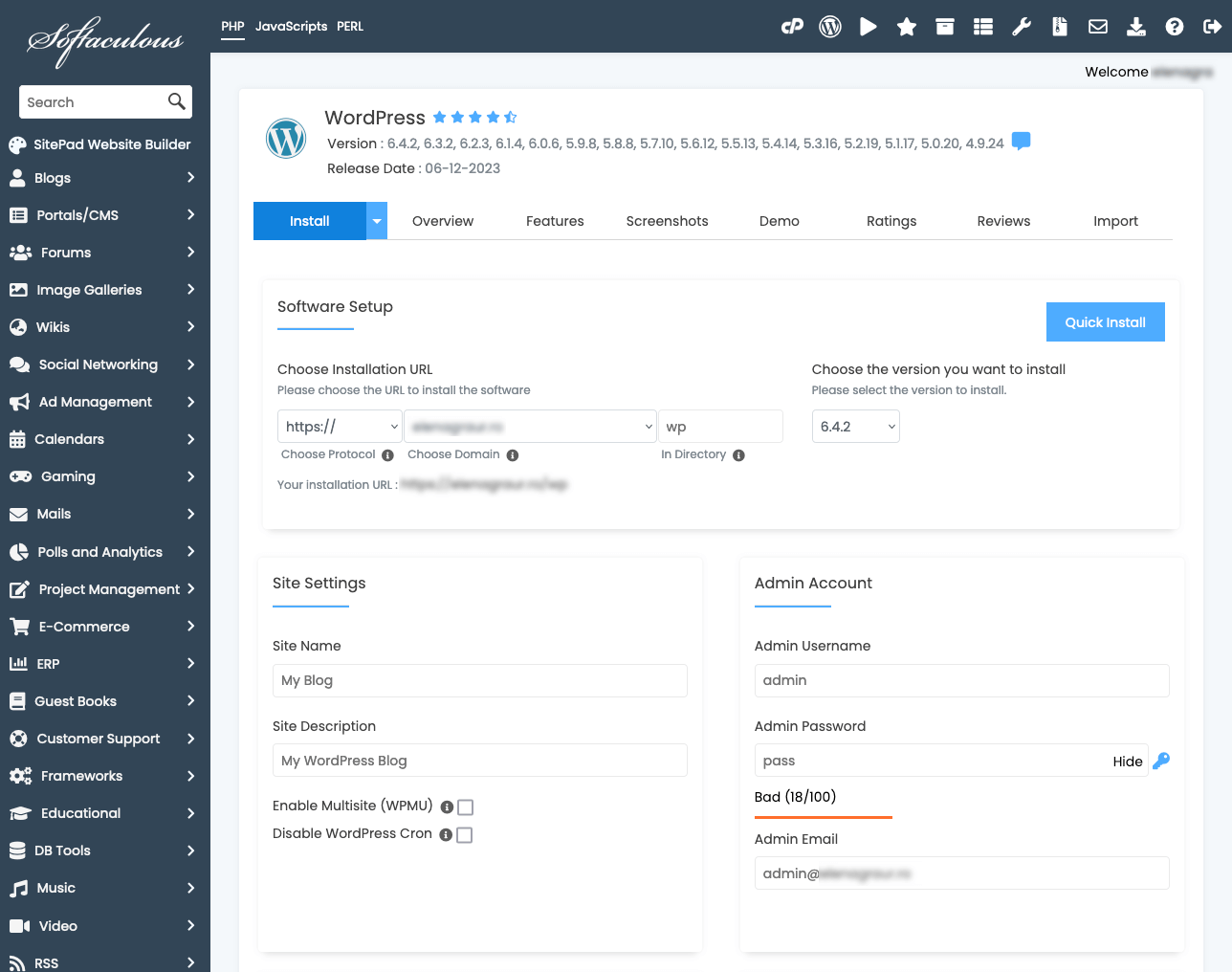
- Find the WordPress Installer: Look for a one-click WordPress installation feature, often found under the ‘Website’ or ‘Software and Services’ sections. Tools like Softaculous, Fantastico, and QuickInstall make this process a breeze.

- Initiate the Installation: Selecting the WordPress installer will lead you through an easy setup. Choose the domain where you want WordPress installed for your photography site.

- Input Your Site Details: You’ll be asked to provide basic information such as your site’s name, an admin username, password, and an admin email address. This is crucial for site management and security.
- Consider Advanced Options: While there might be options to tweak database names or table prefixes, sticking with the default settings generally works well for new photography bloggers.
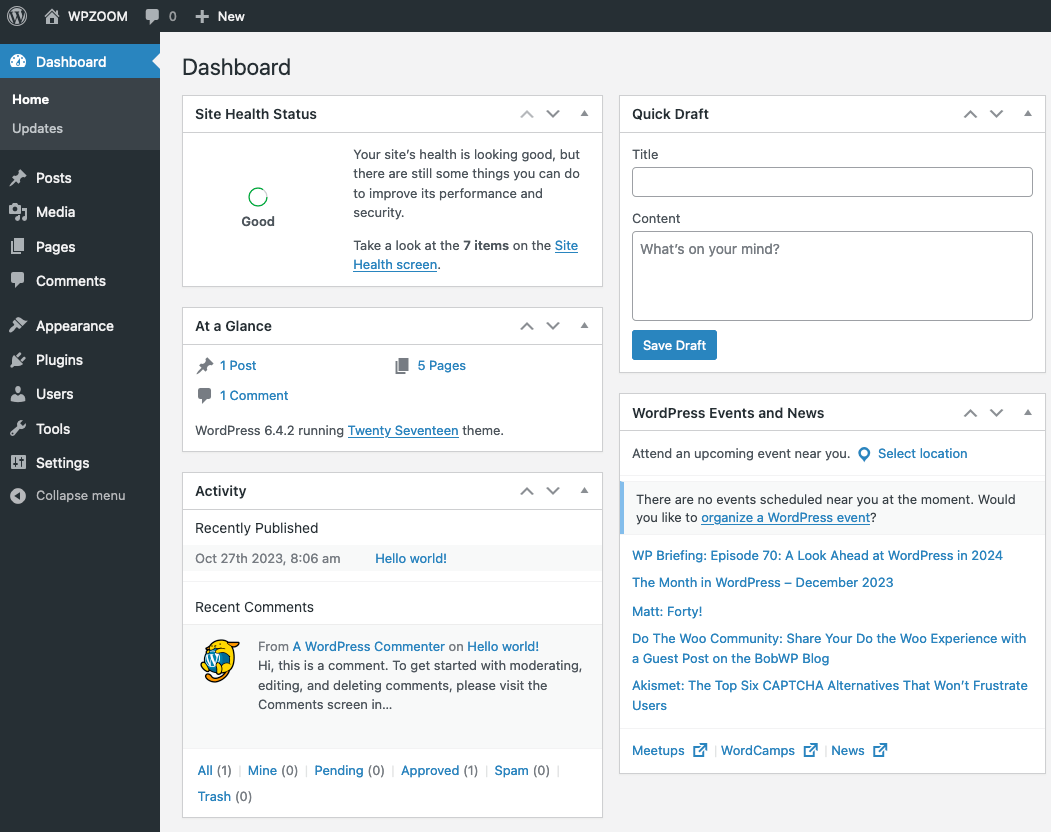
- Log into Your WordPress Dashboard: Once the installation is complete, use your admin credentials to access the dashboard.

This is where the magic happens – managing your site, crafting posts, and personalizing the look of your blog. Spend some time getting comfortable with the WordPress environment. Understanding the dashboard’s layout and features will smooth out your journey into blogging about photography.
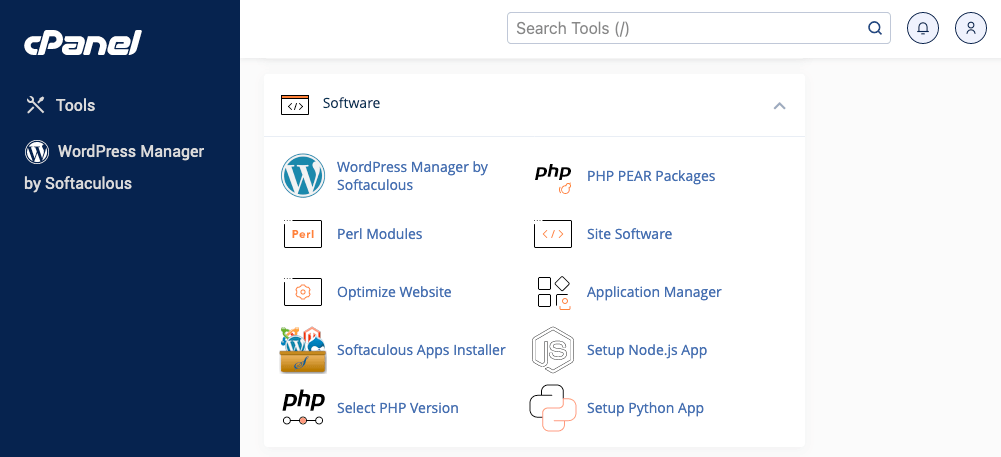
Should you run into any trouble during the setup, your hosting provider’s support team is a valuable resource for WordPress-related issues.
5. Select a Photography Theme
Selecting a suitable WordPress theme impacts your site’s design, functionality, performance, and overall success. While aesthetics play a key role in attracting visitors, ensuring your blog is functional and adheres to SEO guidelines is equally critical.
Considering the precious nature of your time, which is better spent on creating content, capturing stunning images, or sharing your photographic wisdom, we suggest opting for the Eclipse photography theme for your photography blog.
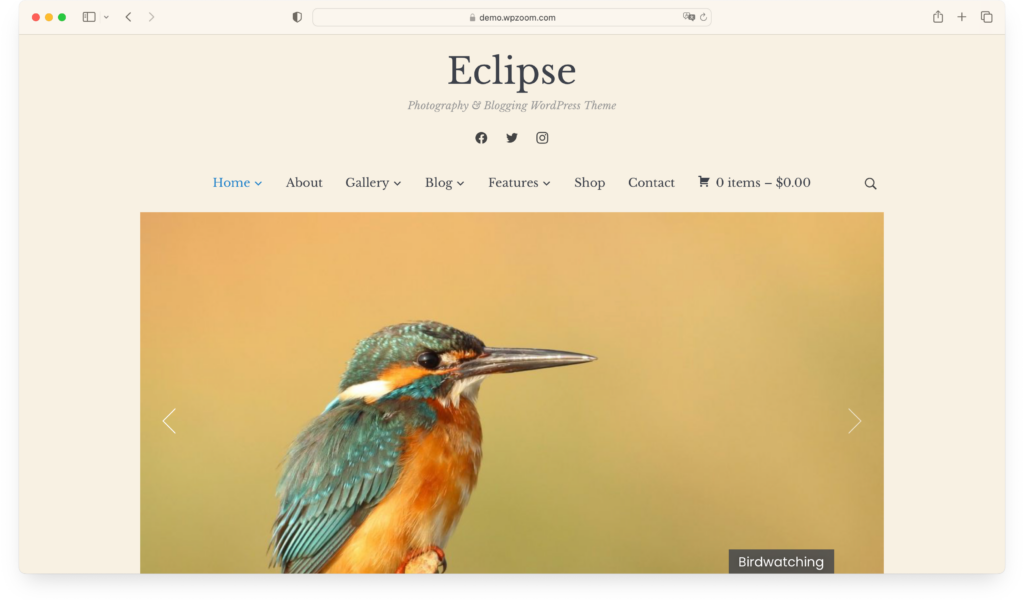
This theme has beneficial features, offers ample customization options, and provides everything needed for a standout photography blog.
Should Eclipse not meet your expectations, or if you’re on the hunt for something unique, there are alternative options available:
You can also check our article about the best WordPress themes for photographers.
6. Customize Blog Settings
When launching a photography blog, the theme you select sets the visual tone, but the real magic happens as you adjust your blog’s settings. This phase is more than just tweaking; it’s about tailoring your site to showcase your photography in the best light and provide a seamless experience for your visitors.
Here’s a straightforward guide to fine-tuning your photography blog:
- Adjusting General Settings: Start in the Settings area of your WordPress dashboard. Here, you can personalize your site title and tagline, reflecting your photography style and niche. Setting your time zone ensures that your posts go live at the intended times, keeping your blog consistent for your audience.

- Crafting a Navigation Menu: A straightforward, intuitive navigation menu is indispensable for a photography blog. It should guide visitors effortlessly to your portfolio, blog posts, about page, and contact information. Customize your menu in Appearance > Menus to make finding your breathtaking photography as straightforward as possible.
- Choosing Your Homepage Layout: First impressions matter, especially in photography. Decide whether you want your homepage to showcase your latest work or introduce your WordPress site site with a static welcome page. Adjust these settings in Settings > Reading to ensure your homepage aligns with your vision.
- Streamlining Comment Management: Interaction with your audience can significantly enrich your blog. Adjust comment settings in Settings > Discussion to control how comments are managed. For instance, moderating comments before they go live can help maintain a positive and professional environment on your blog.
- Optimizing Permalinks: The structure of your URLs (permalinks) might seem like a small detail, but it significantly impacts how visitors and search engines perceive your content. In Settings > Permalinks, you can customize your URL structure to be intuitive and search engine friendly, making it easier for people to find, remember, and share your photography.
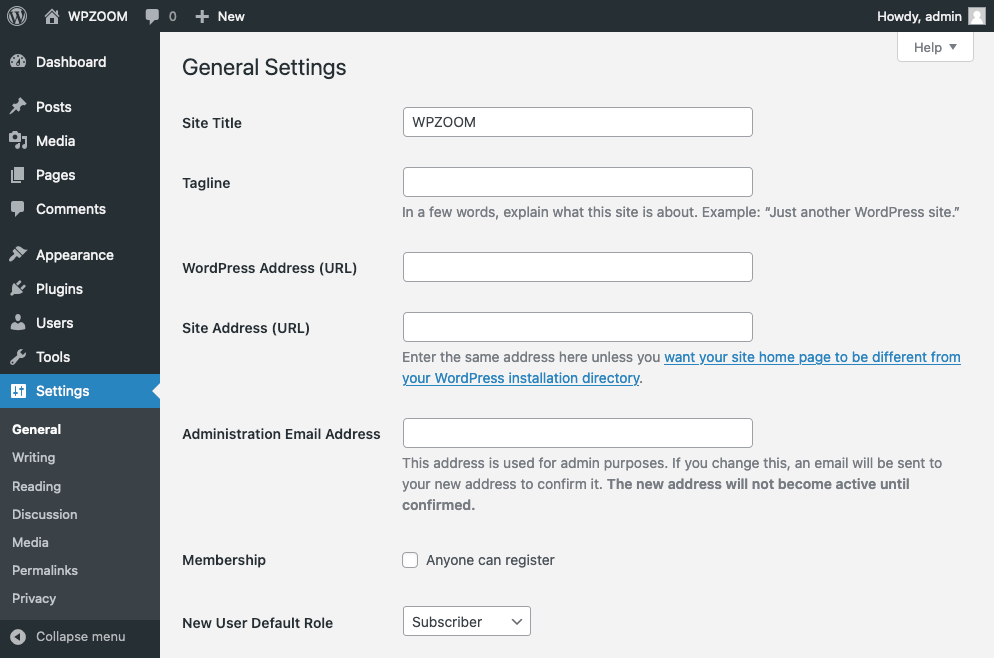
This thoughtful customization ensures your blog looks professional and operates efficiently, giving you more time to focus on capturing the world through your lens.
7. Install Essential Plugins
To elevate your blog beyond basic functionality, incorporating plugins is like adding lenses to your camera – it enhances your blog’s capabilities, allowing for a richer, more engaging user experience.
However, with countless plugins available, selecting the ones that genuinely add value to your photography blog without slowing down its performance becomes critical. Consider what features you want to add to your blog. Whether it’s SEO optimization, social media connectivity, security measures, or e-commerce solutions, there’s likely a plugin available to meet your needs, each with its unique settings and customization options.
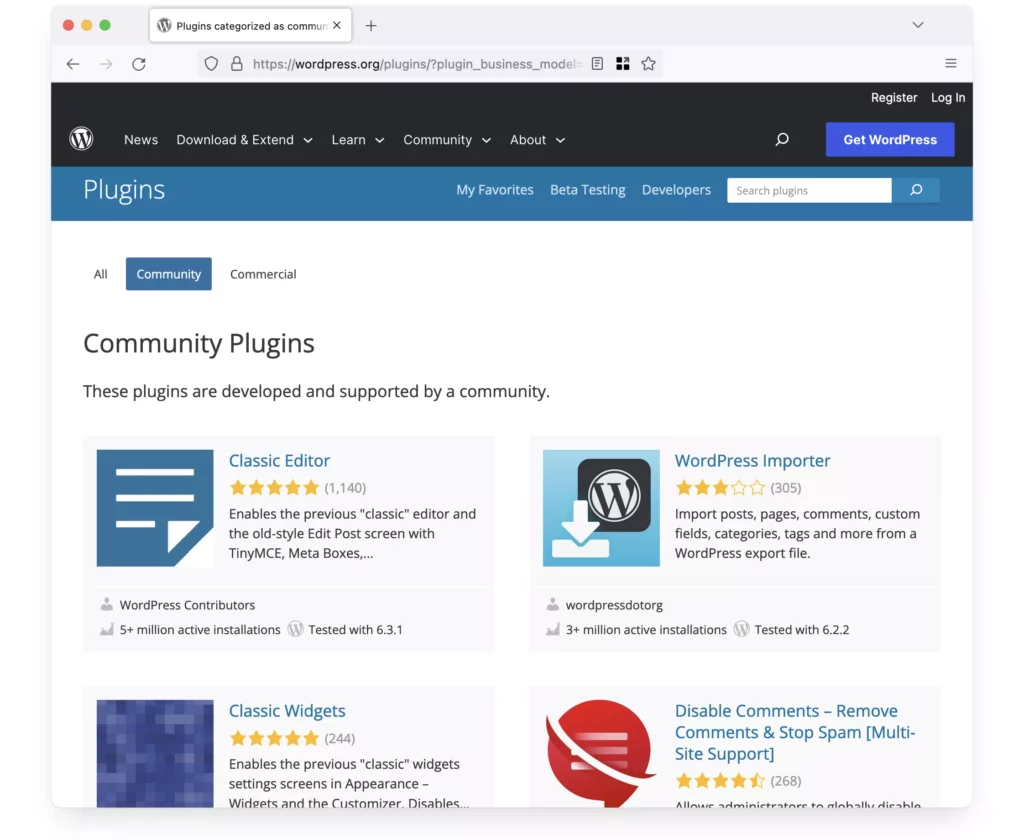
We have compiled a list of recommended plugins that span various categories, offering you access to quality plugins. Keeping your plugins updated is vital for ensuring the security and efficiency of your blog. Neglected plugins can pose security risks and may not integrate smoothly with the latest WordPress updates.
While plugins are invaluable for extending your blog’s functionality, installing too many can slow down your site’s speed. Choose wisely and opt for plugins that are truly beneficial for your photography blog.
8. Plan and Create Captivating Posts
Crafting your content thoughtfully is the cornerstone of any successful blog. While the initial urge might be to flood your blog with content, a more strategic approach to planning will serve you better in the long run.
At the outset, it’s crucial to determine how much time you can dedicate to your photography blog. This decision will guide the creation of your content calendar and dictate your posting frequency. Whether you aim for a daily blog post, a weekly update, or a bi-monthly deep dive, consistency is vital.
Diversity in your content is also vital. While you might be passionate about a specific genre of photography, such as landscape or portrait photography, limiting your blog to just one niche might not capture a wide audience. Write blog posts incorporating a mix of photography tips, tutorials, photography gear reviews, personal experiences, and photography project showcases to keep your content fresh and engaging.
Remember, your blog isn’t just being read by photography enthusiasts and peers. Search engines continuously scan your content to determine where it ranks for specific keywords. Adhering to SEO best practices can significantly impact your visibility and, by extension, your traffic. This means creating content that appeals to your readers and aligns with search engine guidelines to perform well in search rankings.
9. Promote and Expand Your Photography Blog
Social media is a powerful tool for promoting your photography blog. Your choice of promotion method can significantly impact your site’s traffic, making social media platforms a go-to strategy.
If you explore video content, platforms such as YouTube, TikTok, Facebook Reels, and Snapchat can help you attract a substantial audience. For those who prefer the written word, engaging with the community on Reddit or answering questions on Quora can serve as effective content marketing strategies.
For photographers aiming to showcase their work, platforms like Instagram, Facebook, and Pinterest are ideal. The key takeaway is the vast opportunities available for those willing to invest time and effort into their promotional activities.
Building a dedicated community around your photo blog is crucial. Encourage visitors to subscribe to your newsletter or create a Facebook group for your followers. Maintaining communication with your audience and engaging with them regularly fosters a sense of community and loyalty.
In promoting a photography blog, understanding the significance of each platform and how it can best serve your content is vital. Video platforms can offer a behind-the-scenes look at your photography process, while written platforms can provide detailed insights and tutorials. Photo-sharing platforms, on the other hand, directly showcase your work to a broader audience.
WPZOOM offers specialized social media tools to enhance social media integration:
- Social Icons Widget: A simple yet powerful tool for adding social media icons to your website, linking directly to your profiles.
- Instagram Widget: It allows you to display your latest Instagram posts directly on your website.
10. Earn Money from Your Photography Blog
Once your photo blog gains traction and attracts viewers, it’s time to explore various monetization strategies. You can take several paths to convert your blog’s traffic into income, each with its unique benefits and potential challenges.
This topic is broad and can’t be fully covered in a single article, but here are a few strategies that can help you monetize your photography blog effectively and with promising results:
- Display Ads: One of the fastest and simplest ways to earn money is to opt for Google AdSense or another advertising network to display ads on your photo blog. This approach can provide a steady income stream as your blog’s viewership grows.
- Affiliate Marketing: Affiliate marketing can be very profitable if you have the right audience and craft your strategies thoughtfully. Promoting cameras, lenses, photography software, or other photography-related products you use and trust can lead to substantial earnings, especially if your recommendations resonate with your audience.
- Sponsored Content: Establishing partnerships and creating sponsored content can lead to a consistent and lucrative revenue source. This strategy involves working with brands that align with your blog’s theme and audience interest, offering valuable content while monetizing your platform.
- Digital Products: Creating and selling digital products such as online photography courses, ebooks, or photo editing presets can significantly boost your income.
While there are many other ways to monetize your photography blog, these strategies are among the most accessible and commonly used. It’s vital to promote products or services that you genuinely believe in. For instance, if you find a camera or lens indispensable in your work, consider sharing your experience and potentially earning from it. However, it’s advisable only to endorse products you have personally used or tested.
Bottom Line
Starting a blog on photography might initially seem like a mountain to scale. However, recognizing that the guidance offered here will be essential at different phases of your journey should ease some of those concerns.
Crafting a photography blog isn’t an overnight success story. There’s no rush; take your time. The pieces will fall into place, and the rewards will begin to show if your approach is strategic and thoughtful.
To sum up, the critical components include:
- Identifying your photography niche
- Selecting a memorable and relevant name, securing a domain, and setting up web hosting
- Building an engaging photography website using WordPress themes like Eclipse, suited for visual content
- Crafting engaging, SEO-optimized articles
- Using social media to extend your reach
- Finding avenues to monetize your WordPress blog
- Ensuring your photo blog remains fresh and up-to-date
By adopting a focused approach and implementing these practical steps for launching a photography blog, your aspiration of running a successful photography blog is well within reach.