
New Inspiro AI Demo Generator — can't find the perfect demo? Describe your website and AI builds a custom one in about 2 minutes. Learn more →

All Updates

Stay up to date with the newest feature releases, performance enhancements, and essential product updates from WPZOOM.

Latest update: 1 hour ago · 56 releases in the last 30 days · 426 in the last year · 50 products

R Rezzo
Themes Rezzo v1.1.1

Rezzo 1.1.1

Vimeo video playback fixed

This update resolves an issue where private and unlisted Vimeo videos could not be played in the portfolio video lightbox due to a missing privacy hash in the embed URL. This fix ensures proper playback for these videos.

Fixed

  • private and unlisted Vimeo videos did not play in the portfolio video lightbox. Links that carry a privacy hash (vimeo.com/ID/HASH or player.vimeo.com/video/ID?h=HASH) lost the hash when the embed URL was built, so Vimeo refused to play them
Reel
Themes Reel v3.2.0

Reel 3.2.0

New Block Editor Demo

This update introduces a new demo option for the block editor, allowing users to easily set up a complete site design. It also fixes an issue with private and unlisted Vimeo videos not playing correctly in the portfolio and slideshow.

New

  • “Default (Block editor)” demo in the Demo Importer. A version of the default design built entirely with the block editor, with Homepage, About, Services, Blog and Contact pages. The importer installs the Carousel Slider Block and WPZOOM Portfolio plugins it needs

Fixed

  • private and unlisted Vimeo videos did not play in the portfolio video lightbox and the slideshow video popup. Links that carry a privacy hash (vimeo.com/ID/HASH or player.vimeo.com/video/ID?h=HASH) lost the hash when the embed URL was built, so Vimeo refused to play them
V Videozoom
Themes Videozoom v5.0.3

Videozoom 5.0.3

Mobile menu bug fix

This release includes a minor bug fix for the mobile menu, improving overall functionality. No other significant changes were made.

Fixed

  • Minor bug fix with the mobile menu
F Foodie Blocks
Themes Foodie Blocks v1.0.7

Foodie Blocks 1.0.7

Improved accessibility for header search

This release enhances accessibility by ensuring the header search icon has a discernible name for better compliance with PageSpeed audits. Additionally, the mobile menu now features consistent font sizes and spacing for submenu items.

New

  • Accessibility: the header search icon’s accessible name is now also added server-side when the header was customized in the Site Editor, so PageSpeed’s “Links must have discernible text” audit passes on the initial HTML

Improved

  • Mobile menu: submenu items use the same font size as the top-level items and consistent spacing
U UniBlock PRO
Themes UniBlock PRO v1.1.2

UniBlock PRO 1.1.2

Enhanced mobile menu functionality

This update improves the mobile menu by restoring overlay colours and enhancing submenu functionality, which now collapses into an accordion format. The font size for submenus matches that of top-level items for better consistency.

Improved

  • Mobile menu: restored the theme’s overlay colors (WordPress 7.1 started painting the open mobile menu white with white links); submenus now collapse into an accordion (tap the arrow to expand; the current page’s branch opens automatically) and use the same font size as the top-level items
F Foodie Blocks
Themes Foodie Blocks v1.0.6

Foodie Blocks 1.0.6

Enhanced mobile menu usability

This update improves the mobile menu functionality, allowing submenus to collapse correctly and ensuring better visibility and accessibility of menu items. Additionally, the theme's overlay colours have been restored for a consistent appearance.

New

  • Mobile menu: added bottom spacing so the last menu item stays reachable above sticky footer bars/ads, hid the desktop dropdown arrow inside the overlay, and tightened submenu spacing

Improved

  • Mobile menu: submenus collapse again in the overlay menu (WordPress 7.1 started forcing every submenu open); tap the arrow next to a parent item to expand it. The branch containing the current page opens automatically
  • Mobile menu: restored the theme’s overlay colors (WordPress 7.1 started painting the open mobile menu white with white links)
E EduBlock PRO
Themes EduBlock PRO v1.0.6

EduBlock PRO 1.0.6

Improved mobile menu functionality

This update enhances the mobile menu by restoring submenu functionality and improving visibility, ensuring a better user experience on mobile devices. Additional adjustments include spacing improvements and consistent font sizes for submenu items.

New

  • Mobile menu: added bottom spacing so the last menu item stays reachable above sticky footer bars/ads, hid the desktop dropdown arrow inside the overlay, fixed hover/current links being invisible on custom overlay colors, and tightened submenu spacing

Improved

  • Mobile menu: submenus collapse again in the overlay menu (WordPress 7.1 started forcing every submenu open); tap the arrow next to a parent item to expand it. The branch containing the current page opens automatically
  • Mobile menu: restored the theme’s overlay colors (WordPress 7.1 started painting the open mobile menu white with white links); submenu items now use the same font size as the top-level items
F Foodie Blocks
Themes Foodie Blocks v1.0.5

Foodie Blocks 1.0.5

Improved accessibility for search icon

This release improves accessibility by ensuring the header search icon has a discernible name, enhancing compliance with web standards. Existing headers in the Site Editor are also updated to reflect this change.

New

  • Accessibility: the header search icon link now has an accessible name (aria-label “Search” + role “button”; decorative SVG hidden). Fixes the Lighthouse “Links must have discernible text” audit. Applied at runtime too, so headers already saved in the Site Editor are covered.
A Anchor
Themes Anchor v1.0.4

Anchor 1.0.4

Improved accessibility for header search

This update enhances accessibility by improving the header search icon and addresses mobile menu display issues, ensuring a better user experience across devices.

New

  • Accessibility: the header search icon link now has an accessible name (aria-label “Search” + role “button”; decorative SVG hidden). Fixes the Lighthouse “Links must have discernible text” audit. Applied at runtime too, so headers already saved in the Site Editor are covered.
  • Accessibility: the header search icon’s accessible name is now also added server-side when the header was customized in the Site Editor, so PageSpeed’s “Links must have discernible text” audit passes on the initial HTML

Improved

  • Mobile menu: restored the theme’s overlay colors (WordPress 7.1 started painting the open mobile menu white with white links); submenus now collapse into an accordion (tap the arrow to expand; the current page’s branch opens automatically) and use the same font size as the top-level items
V Videozoom
Themes Videozoom v5.0.2

Videozoom 5.0.2

Enhanced Video Widget functionality

Version 5.0.2 enhances the Video Widget, allowing users to add video links from various providers and view live previews. Users can now manage up to 20 videos directly in place, streamlining the process.

Improved

  • the Video Widget now accepts video links (YouTube, Vimeo and any other oEmbed provider) as well as embed codes, and its settings show a live preview card (thumbnail, title, provider) for each video, fill in an empty title from the video, and let you add or remove videos in place (up to 20) instead of picking a count and saving first. Players from links are cached, and settings are sanitized on save
T Tribune
Themes Tribune v4.3.1

Tribune 4.3.1

Enhanced Video Widget functionality

Version 4.3.1 enhances the Video Widget by introducing a playlist format and improved video link support, allowing for easier management and live previews of videos. Users can now add or remove up to 20 videos directly in the settings.

Improved

  • the Video Widget front end is a playlist — each video row shows its thumbnail with the video’s duration and its title, the playing one is highlighted, and the player keeps a 16:9 box while loading
  • the Video Widget now accepts video links (YouTube, Vimeo and any other oEmbed provider) as well as embed codes, and its settings show a live preview card (thumbnail, title, provider) for each video, fill in an empty title from the video, and let you add or remove videos in place (up to 20) instead of picking a count and saving first. Players from links are cached, and settings are sanitized on save
T Tribune
Themes Tribune v4.3.0

Tribune 4.3.0

New

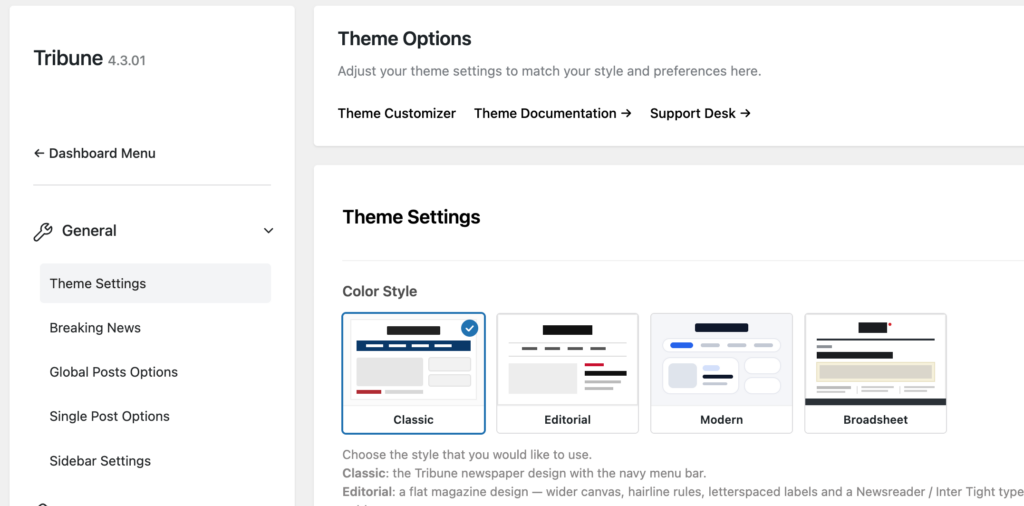
  • “Editorial” Color Style in Theme Options > General.
  • “Modern” Color Style – a soft, card-based design with rounded corners.
  • “Modern” and “Blocks” demos in the Demo Importer, in addition to the Default demo
  • Dark Mode for the Editorial and Modern styles, with a switch in the header and a “Default Color Scheme” option (Light / Dark / System)
  • “Broadsheet” Color Style in Theme Options > General, a revival of the original Tribune 1.0 design: condensed headlines (Barlow Condensed) over serif copy (PT Serif), charcoal rules, a cream-framed full-width feature, a “Breaking News” flag, a charcoal footer and a homepage built from three-column bands. Supports Dark Mode
  • “Featured Wide” (1240×520) image size, used by the Broadsheet feature
  • “Buttons” block style for the Categories / Tags block.
  • “Thumbnail List” block style for the Latest Posts block.
  • “Surface” block style for the Group block.
  • “Home template” block pattern for building the homepage in the editor

Improved

  • Default style refresh. Flat date labels instead of bordered badges, a neutral white Breaking News bar, quieter slider controls (dots + arrow buttons), sidebar widgets with a single hairline border, uppercase dark widget titles, an outlined “Continue Reading” button, and the drop cap without its offset shadow
  • the main navigation now sticks to the top on scroll in the Classic style too (desktop)
  • the Breaking News bar is a CSS animation; the carouFredSel jQuery plugin is no longer shipped
  • the Carousel and Tabs widget scripts only load when those widgets are in use, and the YouTube API only loads when a slide embeds a video
  • the theme icon font and Dashicons are no longer loaded on the front end; icons are inline SVG so the Customizer colors still apply to them
  • Customizer color and typography defaults now match the stock design

Fixed

  • the “Views:” label on single posts was empty for posts with no views
  • the “There are no featured posts” hint in the slider area is now shown to site admins only, not to visitors
  • the Customizer “Blog Posts Title” size was also applied to the Carousel widget titles; it now targets the blog posts list only
G Gourmand
Themes Gourmand v1.2.3

Gourmand 1.2.3

New homepage widgets added

This release introduces two new widgets for the homepage: 'Featured Tag' allows you to display posts by a specific tag, while 'Featured Posts' enables you to select and reorder specific posts regardless of their category or tag.

New

  • “Featured Tag (Homepage)” widget – the same layout and options as “Featured Category (Homepage)”, but shows the latest posts with a specific tag
  • “Featured Posts (Homepage)” widget – hand-pick specific posts (search by title, drag to reorder) regardless of category or tag, with the same layout options (aspect ratio, excerpt, date, etc.)
Foodica PRO
Themes Foodica PRO v5.2.4

Foodica PRO 5.2.4

New homepage widgets added

This release introduces two new widgets for the homepage: a 'Featured Tag' widget to display posts by a specific tag and a 'Featured Posts' widget for selecting and showcasing individual posts.

New

  • “Featured Tag (Homepage)” widget – the same layout and options as “Featured Category (Homepage)”, but shows the latest posts with a specific tag
  • “Featured Posts (Homepage)” widget – hand-pick specific posts (search by title, drag to reorder) regardless of category or tag, with the same layout options (aspect ratio, excerpt, date, etc.)
C Cookely
Themes Cookely v1.4.3

Cookely 1.4.3

New homepage widgets

This release introduces two new widgets for the homepage: 'Featured Tag' allows you to display posts by a specific tag, while 'Featured Posts' lets you select and reorder individual posts, enhancing content visibility.

New

  • “Featured Tag (Homepage)” widget – the same layout and options as “Featured Category (Homepage)”, but shows the latest posts with a specific tag
  • “Featured Posts (Homepage)” widget – hand-pick specific posts (search by title, drag to reorder) regardless of category or tag, with the same layout options (aspect ratio, excerpt, date, etc.)

Have an idea or a feature request?

Tell us what you’d like to see next and vote for ideas from other WPZOOM users.