
New Inspiro AI Demo Generator — can't find the perfect demo? Describe your website and AI builds a custom one in about 2 minutes. Learn more →

All Updates

Stay up to date with the newest feature releases, performance enhancements, and essential product updates from WPZOOM.

Latest update: 7 hours ago · 56 releases in the last 30 days · 426 in the last year · 50 products

Inspiro PRO
Inspiro Inspiro PRO v1.10.26

Inspiro PRO 1.10.26

Vimeo video playback fix

This release fixes an issue with private and unlisted Vimeo videos not playing in the portfolio video lightbox and homepage slider. The autoplay, mute, and loop settings for these links have also been restored.

Fixed

  • private and unlisted Vimeo videos did not play in the portfolio video lightbox and the homepage slider video popup. Links that carry a privacy hash (vimeo.com/ID/HASH or player.vimeo.com/video/ID?h=HASH) lost the hash when the embed URL was built, so Vimeo refused to play them. The slider popup also dropped its autoplay, mute and loop settings for such links
Inspiro Premium
Inspiro Inspiro Premium v9.8.4

Inspiro Premium 9.8.4

Vimeo video playback fixed

This update resolves issues with private and unlisted Vimeo videos not playing in the portfolio video lightbox and slideshow video popup. Autoplay, mute, and loop settings for these links have also been restored.

Fixed

  • private and unlisted Vimeo videos did not play in the portfolio video lightbox and the slideshow video popup. Links that carry a privacy hash (vimeo.com/ID/HASH or player.vimeo.com/video/ID?h=HASH) lost the hash when the embed URL was built, so Vimeo refused to play them. The slider popup also dropped its autoplay, mute and loop settings for such links
Inspiro Premium
Inspiro Inspiro Premium v9.8.3

Inspiro Premium 9.8.3

Fixed header search overlay button

This release addresses an issue with the header search overlay, ensuring that the close button now responds to clicks properly. This fix improves user experience when using the search feature.

Fixed

  • the close (X) button of the header search overlay did not respond to clicks; the button was still set to ignore pointer events from the icon-font days, so clicks fell through to the search field
Inspiro Premium
Inspiro Inspiro Premium v9.8.2

Inspiro Premium 9.8.2

New Menu Panel & Hamburger options

This update introduces a new Menu Panel & Hamburger section in the Customizer, allowing for enhanced menu styles and improved header functionality. Additionally, various design improvements and bug fixes enhance overall usability.

New

  • “Menu Panel & Hamburger” section under Customizer > Header, with visual previews. Menu Panel Style: Side panel (default), Fullscreen, or Fullscreen on mobile only. Hamburger Icon Style: Minimal (default), Two lines, or Classic three lines
  • the fullscreen menu panel lists the main menu top-left in large type; when the Header Builder is off, the header social icons move to the bottom of the panel on mobile
  • the “Hamburger” layout in Customizer > Header > Header Options now works on its own, like in Inspiro PRO: the icon is always shown on desktop and the main menu opens in the panel, with no Sidebar widgets required
  • redesigned widgets in the menu panel: small muted titles, links as rows, dates and counts as secondary text, and a single rounded search field with the icon inside (Search block and classic Search widget)
  • the menu panel and the header search overlay are slightly translucent and blur the page behind them. The “Sidebar Panel Background” option now accepts semi-transparent colors

Improved

  • header icons. The search and hamburger icons are inline SVGs, the hamburger looks the same in the classic header and in the Header Builder, and both icons align with the menu text and header social icons
  • header search. Accessible open/close button with proper labels, Escape closes it and returns focus, the field scales with the viewport
  • the “Show main menu at the top on desktop” option of the Header Builder Menu Toggle and the Hamburger layout share the same panel menu styling
  • Theme Options search (type in the header field or press “/”), Customizer search, keyboard shortcuts reference, a state-aware License page whose check no longer blocks the page while wpzoom.com is slow, and a Demo Importer link in the WPZOOM admin bar menu (WPZOOM Framework 2.2.9)

Fixed

  • the Search block in the sidebar and in the menu panel: field and button layout, button text invisible on hover in the panel and footer
  • widget links in the sidebar were green; they are now dark with a subtle underline, accent on hover. Links in the menu panel are white
  • the hamburger icon turned the accent color on hover, and the panel close button spun into a skewed shape mid-animation
  • sub-menu links in the fullscreen menu panel were too small
  • Theme Options showed the “unsaved changes” warning without any changes, and dependent options were saved as “off” while disabled
Inspiro Blocks PRO
Inspiro Inspiro Blocks PRO v1.0.5

Inspiro Blocks PRO 1.0.5

Improved mobile menu functionality

This release improves the mobile menu by restoring the theme's overlay colours and enhancing submenu functionality, allowing them to collapse into an accordion format. The font size for submenus now matches that of top-level items.

Improved

  • Mobile menu: restored the theme’s overlay colors (WordPress 7.1 started painting the open mobile menu white with white links); submenus now collapse into an accordion (tap the arrow to expand; the current page’s branch opens automatically) and use the same font size as the top-level items
Inspiro PRO
Inspiro Inspiro PRO v1.10.24

Inspiro PRO 1.10.24

Fixed duplicate items in Portfolio

This release addresses an issue with the Portfolio Showcase widget, ensuring that the Load More feature no longer appends duplicate items when used within an Elementor page.

Fixed

  • Load More in the Portfolio Showcase widget appending duplicate items when the widget is placed inside an Elementor page
Inspiro PRO
Inspiro Inspiro PRO v1.10.25

Inspiro PRO 1.10.25

New block editor for dark designs

Inspiro PRO 1.10.25 introduces a new block editor that aligns with your site's dark designs, improved performance options, and support for Bunny Stream in the video lightbox. Several fixes enhance functionality and compatibility.

New

  • the block editor now matches the active Site Layout — dark designs (Eccentric, Agency Dark, Fitness, Tech) are edited on a dark canvas with the design’s colors and fonts, and Customizer color changes are reflected too
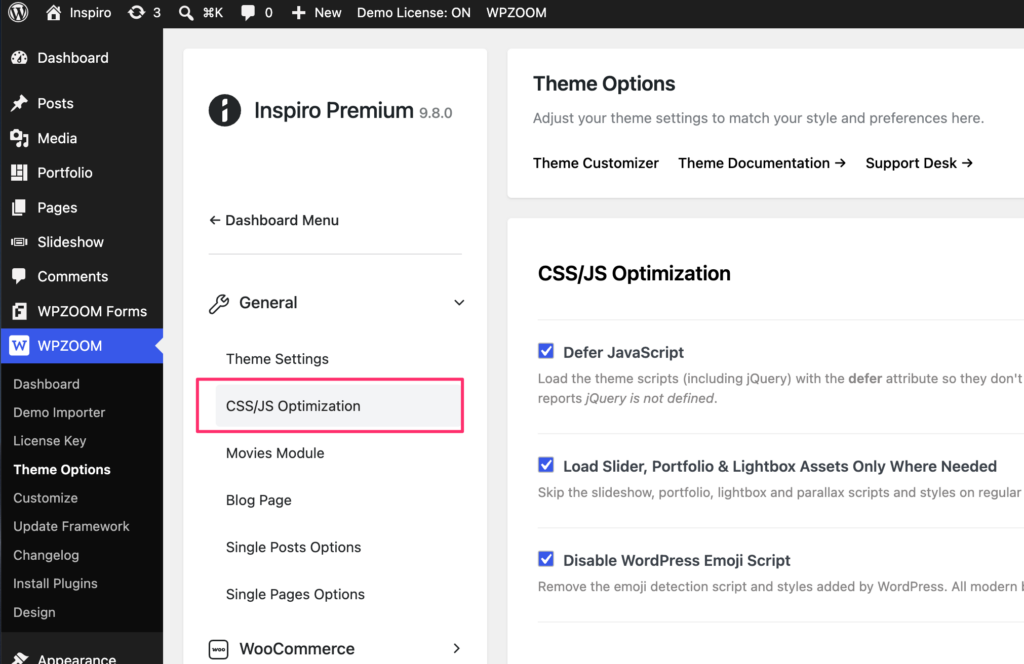
  • Performance options under Theme Options > Theme Settings > CSS/JS Optimization — “Defer JavaScript” and “Disable WordPress Emoji Script”. Both are enabled by default and can be switched off individually if a plugin or custom script needs it
  • Added Bunny Stream (player.mediadelivery.net) support in the video lightbox for portfolio items and the homepage slider
  • Added missing pagination to pages split into multiple pages

Improved

  • PageSpeed. Theme scripts (including jQuery) load with the defer attribute, jQuery Migrate is no longer loaded on the front end and Google Fonts connections are preconnected

Fixed

  • Fixed wide/full-width blocks overlapping the sidebar on the blog page when full post content is displayed
  • Fixed Elementor global typography variables not inheriting the theme fonts
  • Fixed the editor stylesheet being enqueued with an invalid version string
Inspiro Premium
Inspiro Inspiro Premium v9.8.1

Inspiro Premium 9.8.1

Fixed Load More duplicates issue

This release addresses an issue in the Portfolio Showcase widget where the Load More feature was appending duplicate items and remaining visible after all items were loaded. This fix enhances the user experience when browsing portfolio items.

Fixed

  • Load More in the Portfolio Showcase widget (Elementor) appending duplicate items and remaining visible after all items were loaded
Inspiro Premium
Inspiro Inspiro Premium v9.8.0

Inspiro Premium 9.8.0

New

  • Performance options under Theme Options > Theme Settings — “Defer JavaScript”, “Load Slider, Portfolio & Lightbox Assets Only Where Needed” and “Disable WordPress Emoji Script”. All three are enabled by default and can be switched off individually if a plugin or custom script needs it

Improved

  • PageSpeed. Theme scripts (including jQuery) load with the defer attribute, the slideshow/portfolio/lightbox scripts and styles load only on pages that use them, the bundled Inter and Onest fonts are served locally as small language subsets with preload, all stylesheets are minified and Google Fonts connections are preconnected
  • the core stylesheet is about a third smaller (160 KB → 105 KB).
Inspiro Starter Sites
Inspiro Inspiro Starter Sites v1.2.4

Inspiro Starter Sites 1.2.4

AI Demo Generator exclusivity fixed

This release fixes an issue where the AI Demo Generator appeared in the dashboards of other WPZOOM premium themes, ensuring it is now exclusive to Inspiro and Inspiro Premium.

Fixed

  • The AI Demo Generator no longer appears in the dashboard of other WPZOOM premium themes — it is available only with Inspiro and Inspiro Premium
Inspiro Premium
Inspiro Inspiro Premium v9.7.7

Inspiro Premium 9.7.7

Improved sidebar layout functionality

This release addresses several layout issues, ensuring that the 'Sidebar on the Right' template is respected and preventing overlaps with wide blocks. Additionally, it resolves a resizing issue with Fit Text headings in the Slideshow.

Fixed

  • Fixed the per-post “Sidebar on the Right” template being ignored when the global single post layout was set to Full Width
  • Fixed wide/full-width blocks (Gallery, Cover, etc.) overlapping the sidebar in the single post sidebar layout
  • Fixed Fit Text headings inside Slideshow slides endlessly resizing due to a CSS transition conflicting with the fit calculation

Have an idea or a feature request?

Tell us what you’d like to see next and vote for ideas from other WPZOOM users.