FLASH SALE Get 20% OFF everything using the coupon code: FLASH20 View Pricing Plans →
All WPZOOM themes include styling options in the Customizer, so you can easily make changes to fonts or colors to personalize your website as you want.
If you want to customize specific details in your theme which is not available to be customized through the Customizer, you have two options:
Looking for an easy way to customize your theme?
Try YellowPencil Pro, a Visual Design Tool for WordPress or the Stylebot extension for Google Chrome.
CSS, or Cascading Style Sheets, is a way to apply style rules to HTML content.
Using this method, you’ll be able to customize elements that can’t be modified using the built-in styling options from your theme.
Custom CSS code can be added directly in the Customizer > Additional CSS section:
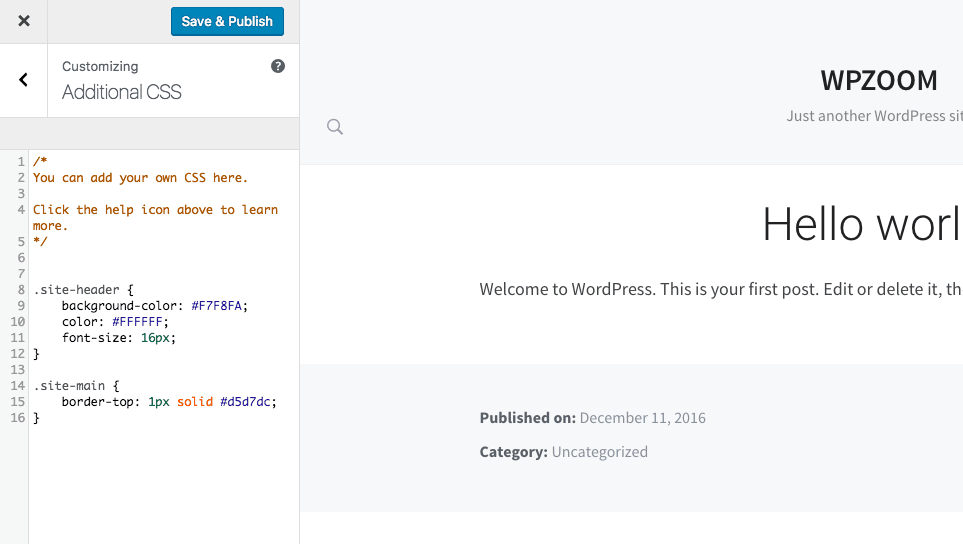
Custom CSS in Customizer
By adding custom CSS code you can easily change fonts, colors, background, margins and paddings in your theme:
The theme’s original CSS can be found using your browser’s web inspector tools. This is the preferred way to view CSS because it’s more comprehensive and will show you all the CSS that applies rather than just a subset.
These three basic steps will work in most current browsers to open the web inspector:
The panel will show the HTML for the element you clicked and all the CSS that applies to it. You can click on different HTML elements in the panel and then look at the CSS on the right to figure out what CSS can be copied into your Custom CSS panel to make design customizations on CSS.
Here is a video walkthrough showing how the web inspector works in Google Chrome:
Other resources:
CSS Basics
How to Inspect Element on Chrome: Easy Ways to Edit a Web Page
[Video] How to add Custom CSS to WordPress
[Video] Using Custom CSS Plugins to Edit WordPress
This is a more complex method, allowing you to customize everything in a theme: from functions to page templates and much more.
A WordPress child theme is a theme that inherits the functionality of another theme, called the parent theme, and allows you to modify or add to that parent theme’s functionality.
Continue reading here: How to Create a Child Theme for a WPZOOM Theme
One of the most important reasons for using Child Theme is that you’ll be able to update your theme in the future without worrying that you’ll lose any of your modifications.